Changes
Page history
bjoern.butzin created page: home
authored
Sep 09, 2016
by
Björn Butzin
Hide whitespace changes
Inline
Side-by-side
home.markdown
View page @
3ba1e9aa
...
...
@@ -17,15 +17,14 @@ The following points will be covered by this tutorial:
*
Prepared JAVA project files for Hands-on
## 2. Installation of Copper Plugin for Mozilla Firefox


-
https://addons.mozilla.org/de/firefox/addon/copper-270430/
-
Click on „add to Firefox“ & Confirm Installation
-
Restart Firefox
After the installation you can enter coap://host:port/resourcePath/?query=filter.
Copper will allow you to make any CoAP interaction interactively.
Copper will allow you to make any CoAP interaction interactively.

## 3. Introduction of jCoAP
...
...
@@ -33,14 +32,14 @@ Copper will allow you to make any CoAP interaction interactively.
-
http://ws4d.org/
-
https://gitlab.amd.e-technik.uni-rostock.de/ws4d/jcoap
### Task 1 – Sequence Diagram

### Task 1 – Sequence Diagram

Server Side

Server Side

Client Side

Client Side

**Server:**
individual implementation of a server application, creates CoapResourceServer and resources
**TemperatureResource:**
individual resource, inherits from BasicCoapResource
...
...
@@ -53,8 +52,8 @@ Client Side
**Client:**
individual implementation of a client application, implements CoapClient (interface)
**CoapClient (interface):**
describes interfaces that must be supported by a client
*
ToDo on server side:

*
ToDo on server side:

1.
Create a new resource class TemperatureResource
2.
Instantiate a new ResourceServer
3.
Instantiate a new TemperatureResource
...
...
@@ -62,8 +61,8 @@ Client Side
5.
Run the ResourceServer
*
ToDo on client side:

*
ToDo on client side:

1.
Establish a connection to the Server using the ChannelManager
2.
Create a CoapRequest & add some Options
3.
Send the CoapRequest
...
...
@@ -74,17 +73,17 @@ Client Side
You can find the required files in our repository at https://gitlab.amd.e-technik.uni-rostock.de/ws4d/jcoap/tree/master/ws4d-jcoap-handsOn
1.
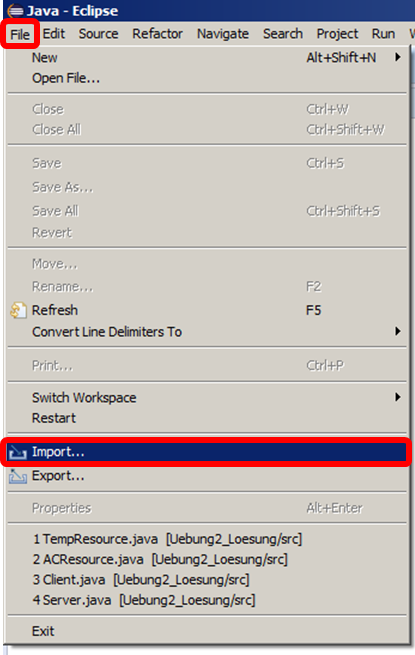
File > Import

2.
General > Existing Projects ...
3.
Click ‚Next‘

1.
File > Import
2.
General > Existing Projects ...
3.
Click ‚Next‘

4.
Browse
<Select
Project
Folder
>
5.
Click ‚Finish’

5.
Click ‚Finish’

*
the resulting GUI should look like this:

*
the resulting GUI should look like this:

*
We have prepared some FIXME and TODO annotations:
*
Just open the „Task“ view
...
...
@@ -185,7 +184,7 @@ You can find the required files in our repository at https://gitlab.amd.e-techni
*
If you have written your own resources before: GET them
## 6. Task 2: Implementation of a AC control by using the CoAP-observe mechanism


1.
Use the eventing mechanism CoAP-Observe
2.
Let the server notify clients every 5 seconds about a changed TemperatureResource
3.
Implement an Air Conditioner Resource with the path “/ACControl”, that can be set to “high”,
...
...
...
...
